
We talk about JavaScript. Each month in Warsaw, Poland.


Quite standard requirements: API calls, pagination, filters
I wanted to do it in the most simple way (no jQuery), and learn something
Internal project, should just work
I've heard Vue is gaining traction, why not to try it?
Learning from the mistakes and successes of React & Angular
HTML is HTML, JS is JS, CSS is CSS
Progressive web framework
Never stands in your way
Right amount of Magic
Frontend part implemented using Vue and Bulma in just one HTML file
Done in 6h since a first look to the documentation
Very clean, readable code
Final impression - it was so simple! Let's try something bigger
                <script src="https://unpkg.com/vue"></script>
                <div id="app">
                    {{ message }}
                </div>
                var app = new Vue({
                  el: '#app',
                  data: { message: 'Hello Vue!' }
                })
                <div id="app">
                    Hello {{ name }}!
                    <button @click="modify">Where I am?</button>
                </div>
                new Vue({
                    el: "#app",
                    data: { name: 'Vue' },
                    methods: {
                        modify: function() {
                            this.name = 'WarsawJS'
                        }
                    }
                })
                <div id="app">
                    <div v-if="name">
                        Hello {{ name }}!
                    </div>
                    <div v-else>
                        Who are you?
                    </div>
                    <input v-model="name" placeholder="name">
                </div>
<input v-model="name">
is the same as
                <input v-on:input="name = $event.target.value"
                       v-bind:value="name">
is the same as
                <input @input="name = $event.target.value"
                       :value="name">
                data: {
                  entries: []
                },
                methods: {
                  addEntry: function () {
                    this.entries.push(this.entry)
                    this.entry = '';
                  }
                }
                computed: {
                  filteredEntries: function () {
                    var bad = ['bad', 'weak', 'boring']
                    return this.entries.filter(function(entry) {
                      return bad.indexOf(entry.toLowerCase()) === -1
                    })
                  }
                }
                filters: {
                  shout: function(value) {
                    return 'They said "' + value + '"!';
                  }
                }
                <input v-model="entry" @keyup.enter="addEntry">
                <div v-if="filteredEntries">
                    <ul>
                        <li v-for="e in filteredEntries">
                            {{ e }}
                        </li>
                    </ul>
                </div>
                data: {
                  query: '',
                  searching: false,
                  people: []
                },
              search: function (query) {
                this.searching = true;
                axios.get('https://swapi.co/api/people/', {params: {search: query}})
                  .then(function(response) {
                    that.people = response.data.results.map(...);
                    that.searching = false;
                  })
              }
              watch: {
                query: function(value) {
                  this.search(value)
                })
              }
              watch: {
                query: _.debounce(function(value) {
                  this.search(value)
                }, 500)
              }
                <input v-model="query" placeholder="Search...">
                <div v-if="searching">Searching...</div>
                <div v-else-if="people.length > 0">
                    <div v-for="person in people">
                        {{ person }}
                    </div>
                </div>
                <div v-else>No records found</div>

                Vue.component('vue-data', {
                  props: ['data'],
                  template: '<pre class="data">' +
                            '  $data: {{ JSON.stringify(data) }}' +
                            '</pre>'
                })
<vue-data :data="$data"></vue-data>
There are also "slots"
                <template><slot name="content">Placeholder</slot></template>
                <component>
                    <h1 slot="content">Important content</h1>
                </component>
                <template>
                    <div class="hello">{{ msg }}</div>
                </template>
                <script>
                    export default {
                        data: () => ({ msg: "Hello, components!" })
                    }
                </script>
                <style language="scss" scoped>
                    div {
                        color: red;
                        .hello {
                            font-size: 2em;
                        }
                    }
                </style>
                <template>
                    <component>{{ msg }}</component>
                </template>
                <script>
                    import Component from './component.vue'
                    export default {
                        components: { Component }
                    }
                </script>
React - usually passing function as a prop
Angular - $emit() + $on() with scopes
Vue - $emit() + v-on:event="", only direct children
<button @click="$emit('clicked')">Submit</button>
Parent
<child @clicked="alert('yay')"></child>
<button @click="$emit('clicked', 'Hello')">Submit</button>
Parent
<child @clicked="value => alert(value)"></child>
How Vue works under the hood?
Utilizes a virtual DOM
Provides reactive and composable view components
Lightweight, no batteries included
Beautiful, readable HTML additions
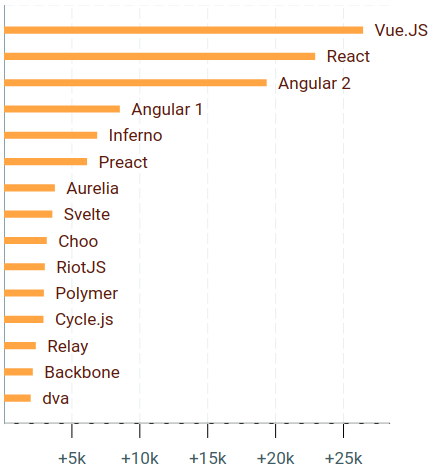
It (Vue.js) has also grown from “yet another side project” into an ecosystem with over 300 contributors across the Vue.js organization,and maintained by a core team of over 20 active members across the globe
Vue is built on the component-based model for UI development which is a proven pattern shared among all major frameworks, with solid official solutions for SPA routing and large-scale state management. It is designed for approachability, but is also designed with scale in mind.